
 Mark Stefanos
Los Angeles switched on its first automated speed cameras Monday, Oct. 26, with 26 of the 125 planned camera corridors now active. The remaining locations are expected to come online by the end of the year.
For now, drivers caught speeding will receive warnings. Each camera location has a 60-day warning period before the city begins mailing citations, which range from $50 to $500 depending on how far above the speed limit a vehicle is traveling. The first fines are expected to arrive in late December.
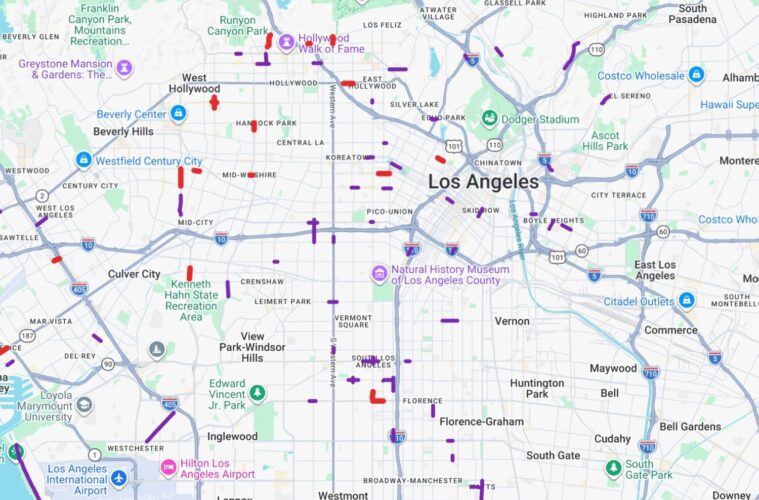
To show drivers exactly where enforcement is taking place, we built a map of all 125 monitored road segments. Active corridors appear in red, while locations still under construction are marked in purple. It’s free, and you can save it to Google Maps on your computer or phone in about a minute here:
LA Weekly’s LA Speed Camera Google Map
And be sure to always drive safe and within the speed limit.
How to add the map to Google Maps
The map opens in any web browser. To access it through the Google Maps app on your phone, you must first open it while signed in to your Google account.
On a computer
- Sign in to your Google account.
- Open the map link. It will load in Google My Maps.
- Visit google.com/maps and click Saved, then Maps. The speed camera map should appear in your list.
On a phone
- Open the map link in your phone’s browser while signed in to the same Google account you use for Google Maps. You can also open it on a computer first using the steps above. **If you are opening this link via Instagram’s browser, make sure you open the page via your phone’s native browser, like Safari or Chrome, or directly into Google Maps, by clicking the three buttons in the top right corner.**
- Launch the Google Maps app and tap Saved at the bottom of the screen.
- Scroll down to Maps and select “LA Speed Camera Corridors.” The camera locations will appear over your regular map.
How the program works
The cameras photograph the rear license plate of any vehicle traveling at least 11 mph over the posted speed limit. The registered owner receives a notice by mail within 15 days. Each location has two cameras, covering traffic in both directions.
LADOT issues the citations as civil penalties, separate from police-issued tickets. Drivers will not receive points on their licenses, according to the department, and have 30 days from the mailing date to request a review.
Low-income drivers can apply for a payment plan or complete community service in place of paying the fine.
| Speed over the limit | Fine |
| 11–15 mph | $50 |
| 16–25 mph | $100 |
| 26 mph or more | $200 |
| 100 mph or faster | $500 |
Privacy. The cameras capture rear license plates, not images of drivers or passengers. Data from plates that do not result in a ticket must be deleted within five business days. LADOT says it will not share the information with local, state or federal agencies without a court order.
The money. LADOT estimates the program will cost approximately $7.95 million annually. Revenue from citations will first cover operating expenses. Any surplus must be directed toward traffic-calming projects within three years.
Why now. California lawmakers authorized the cameras in 2023 through Assembly Bill 645, establishing a five-year pilot program that runs through 2032. LADOT says speeding contributed directly to roughly one in five fatal crashes in Los Angeles in 2024. The LAPD recorded 290 traffic deaths in 2025. San Francisco, the first California city to activate its speed cameras, has reported reductions in speeding of more than 70% at camera locations.
Where the cameras are
All 15 Los Angeles City Council districts will have eight or nine camera corridors. LADOT began by identifying its Priority Safety Corridors, a network of 550 miles of streets with the city’s worst crash records. The department then evaluated individual road segments using factors including speed-related crashes, measured speeding and proximity to schools and senior centers.
LADOT provided each council office with its 14 highest-scoring locations, and each office selected seven. Department staff chose the remaining 20 sites. Most monitored stretches cover just a few blocks, typically a quarter-mile or less.
| Street | Stretch | Neighborhood |
| Foothill Blvd | Newhome Ave to Sherman Grove Ave | Sunland-Tujunga |
| Sepulveda Blvd | Tupper St to Plummer St | North Hills |
| Nordhoff St | Petit Ave to Gothic Ave | Northridge |
| Balboa Blvd | Plummer St to Lassen St | Northridge |
| Victory Blvd | Noble Ave to Cedros Ave | Van Nuys |
| Coldwater Canyon Ave | Vanowen St to Bassett St | North Hollywood |
| Victory Blvd | Ethel Ave to Coldwater Canyon Ave | Valley Glen |
| Oxnard St | Ethel Ave to Coldwater Canyon Ave | Valley Glen |
| Los Feliz Blvd | Near Hobart Blvd (LADOT lists it as Western Ave, Franklin Ave to Los Feliz Blvd) | Los Feliz |
| Franklin Ave | Cheremoya Ave to Tamarind Ave | Hollywood |
| Highland Ave | Franklin Pl to Camrose Dr | Hollywood |
| Santa Monica Blvd | Hobart Blvd to Normandie Ave | East Hollywood |
| Melrose Ave | Hayworth Ave to Orange Grove Ave | Fairfax |
| Fairfax Ave | Clinton St to Waring Ave | Fairfax |
| La Brea Ave | 1st St to Beverly Blvd | Fairfax |
| Olympic Blvd | La Brea Ave to Sycamore Ave | Mid-Wilshire |
| Olympic Blvd | Alvira St to Stearns Dr | Carthay |
| La Cienega Blvd | Pico Blvd to Olympic Blvd | Carthay |
| Beverly Blvd | Belmont Ave to Witmer St | Westlake |
| 8th St | Westmoreland Ave to Hoover St | Koreatown |
| National Blvd | Webster Middle School to the 405 | Mar Vista |
| Venice Blvd | Pisani Pl to Lincoln Blvd | Venice |
| La Cienega Blvd | Coliseum St to Bowesfield St | Baldwin Hills |
| Vermont Ave | Florence Ave to 68th St | Vermont-Slauson |
| Florence Ave | Vermont Ave to Hoover St | Vermont-Slauson |
| Gaffey St | 2nd St to 1st St | San Pedro |
The map includes all 125 corridors, including the 99 where cameras are still under construction.
Tap any corridor to view its street name, cross streets, speed limit and current enforcement status.
If the map doesn’t appear: Google Maps displays only your most recently opened custom maps. Open the link again while signed in to your account, and it should return to the top of the list.
Apple Maps does not support Google’s custom maps. iPhone users who don’t use Google Maps can bookmark the link and view it in a browser.